
Hire a WooCommerce Developer Who Can Build for Growth
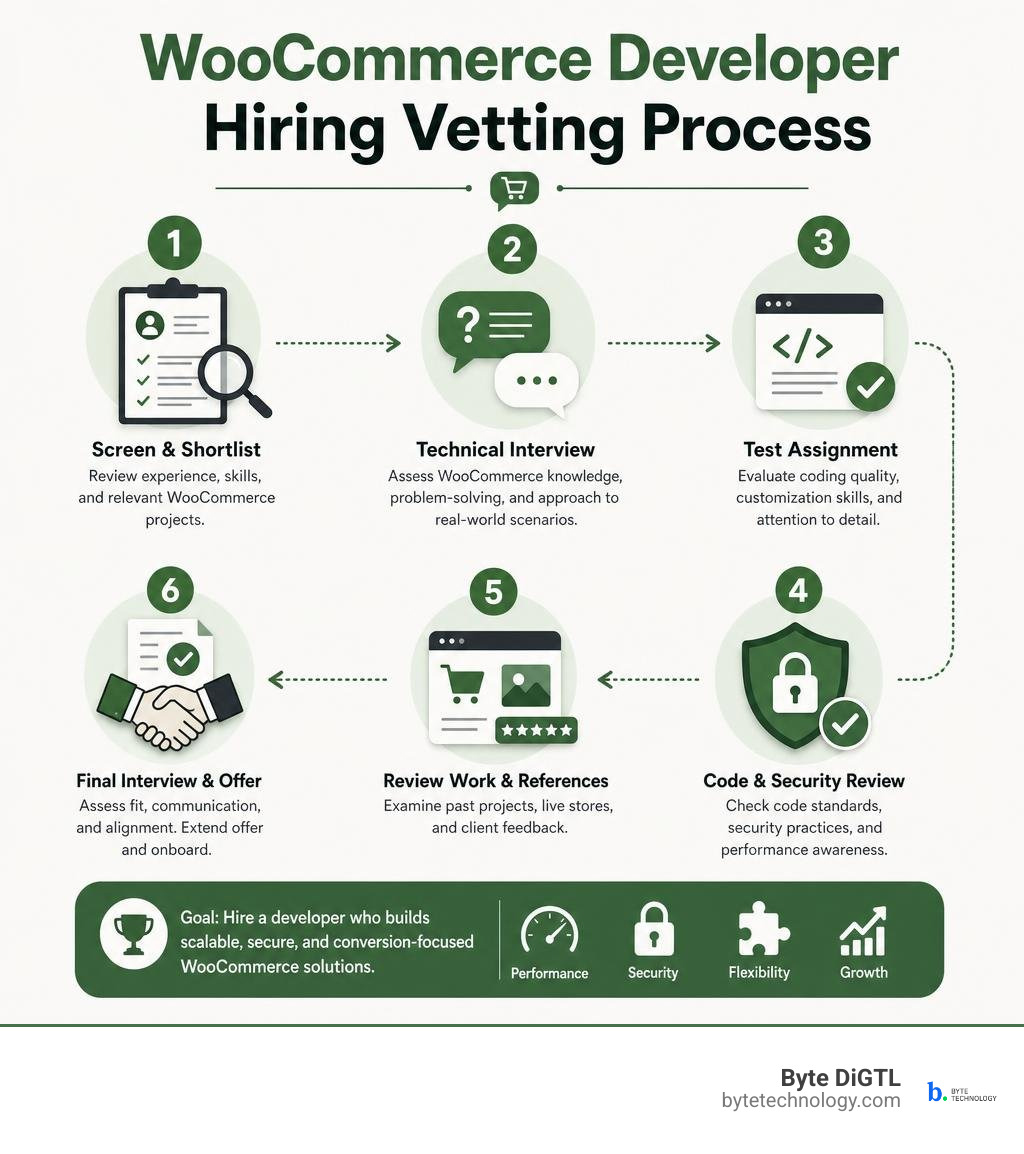
To hire the right WooCommerce developer, look for proof that they can do more than install a theme or add a plugin. Ask candidates to explain how they handle custom checkout features, payment gateways, performance, security, updates, and testing. Then review relevant live stores or code samples, define the project scope in writing, and start with a small paid task before committing to a large build.
WooCommerce is an open-source e-commerce platform built on WordPress. It supports everything from physical products and digital downloads to subscriptions, appointments, and custom buying flows. That flexibility is valuable, but it also makes weak development choices expensive. A poorly built plugin, theme override, or checkout customization can slow down the store, break during updates, or create friction where customers are ready to buy.
The best hire understands the line between store design and store logic. They put durable business features in extensions, keep theme work focused on presentation, and use WooCommerce’s current APIs for block-based Cart and Checkout experiences. This guide will help you spot that expertise without needing to become a developer yourself.
What to Look for in a Professional WooCommerce Developer

Hiring an engineer to handle your online storefront requires evaluating technical foundations that go far beyond standard web design. WordPress powers over 43% of the internet, and WooCommerce accounts for more than 28% of all online stores globally. With over 5 million active installations and a catalog of more than 1,000 marketplace extensions, the platform offers unmatched flexibility. However, that popularity also attracts self-proclaimed experts whose experience stops at drag-and-drop page builders.
When you invest in Ecommerce Website Development – What You Need to Know, you must seek professionals who write clean, object-oriented PHP, strictly validate incoming data, and respect code encapsulation. A great engineer structures custom code to survive core platform updates, prevents plugin conflicts, and guards against security vulnerabilities.
Core Technical Competencies of a Senior WooCommerce Developer
A senior engineer treats your store backend like enterprise software. That starts with adopting proven design patterns and adhering to official platform architecture.
- Design Patterns: They implement a Singleton pattern on the core extension class to prevent multiple conflicting instances during a single PHP execution cycle.
- Encapsulation: They use protected constructors and override cloning methods (
__cloneand__wakeup) to stop arbitrary class duplication. - Execution Timing: They delay initialization by hooking into
plugins_loadedat default priority (10) after checkingclass_exists( 'WooCommerce' ), rather than instantiating logic prematurely. - Dependency Management: They leverage Composer autoloader configurations instead of chaining dozens of manual
require_oncestatements. - Security and Leaks: They include direct access guards like
defined( 'ABSPATH' ) || exit;at the top of every PHP file and use distinct namespace prefixes across all functions and classes.
For a detailed breakdown of how to design a simple extension, review the How to design a simple extension | WooCommerce developer docs.
Store API and Modern Checkout Integration
As WooCommerce shifts toward modern block-based Cart and Checkout flows, the days of relying solely on legacy PHP hooks and generic AJAX endpoints are over. Today, custom checkout logic interfaces directly with the WooCommerce Store API.
Modern extensions must interact safely with block states. For instance, extensions are restricted from mutating client-side cart states directly in JavaScript to prevent data corruption. Instead, a developer registers server-side callbacks using woocommerce_store_api_register_update_callback hooked to woocommerce_blocks_loaded, and triggers updates from the frontend via extensionCartUpdate from the @woocommerce/blocks-checkout package.
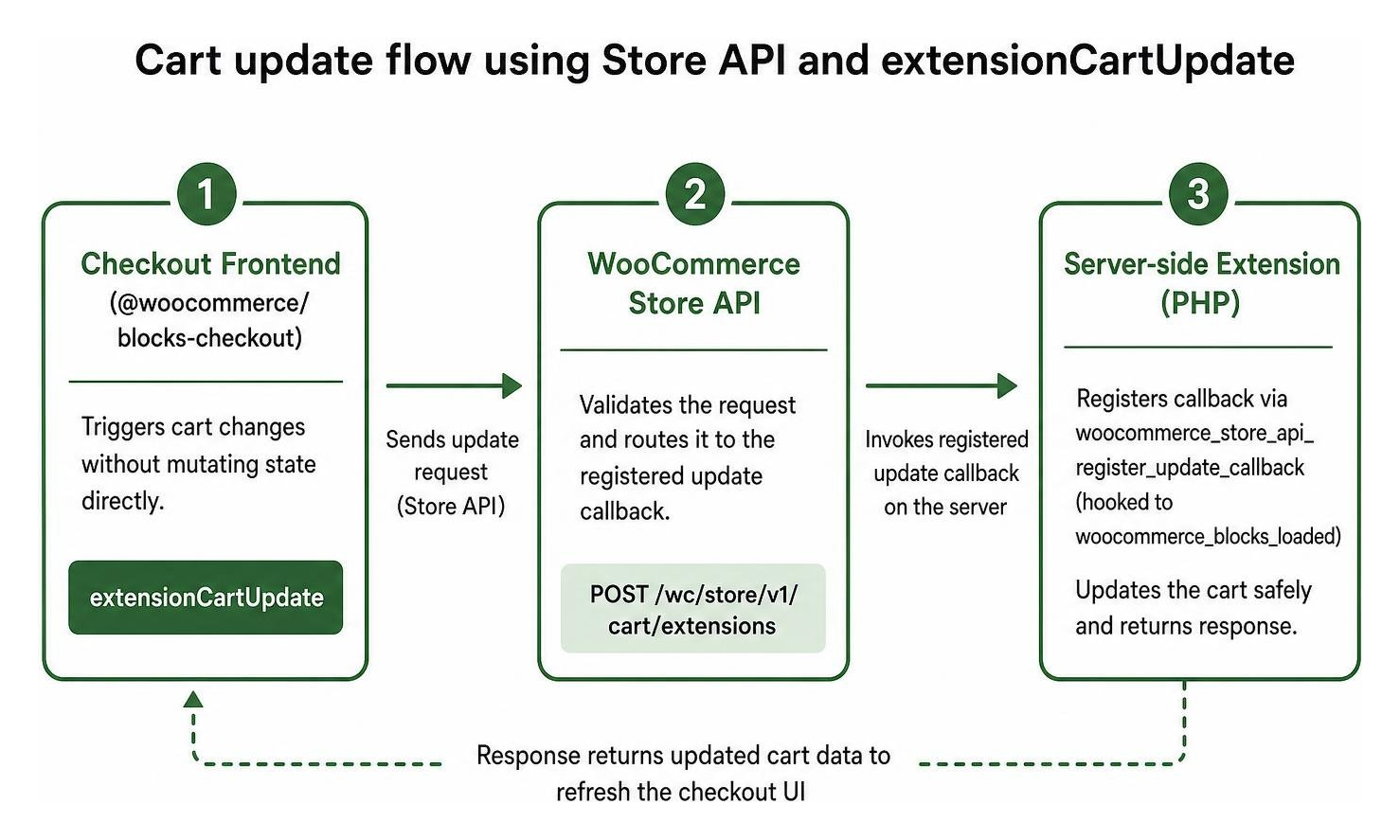
If you are building custom points redemption, complex discount matrices, or custom metadata capture, your engineer must know how to route actions through these callbacks. Read the official documentation on extending the Store API to update the cart to see how modern checkout architecture handles on-demand state updates cleanly.
Local Environments and Development Standards

Professional engineers never write or debug custom code directly on a live production server. A qualified developer operates within a standardized local environment tailored for WordPress and WooCommerce. They use POSIX-compliant setups (or Windows Subsystem for Linux), configure Node.js version pinning via PNPM monorepos, and execute automated build routines.
Local Tooling: WordPress Studio vs. wp-env
Modern extension development relies on fast, reproducible local stacks. Two of the most common approaches include WordPress Studio and @wordpress/env (wp-env).
When using the official @woocommerce/create-woo-extension scaffolding tool, developers can quickly generate extensions pre-configured with block metadata, linting, tests, and local server integration. Check out the guide on building-your-first-extension for the full scaffolding command structure.
| Feature / Tool | WordPress Studio | wp-env | Standard Docker / Herd / DDEV |
|---|---|---|---|
| Primary Use Case | Rapid standalone local development | Automated CLI testing and extension builds | Custom enterprise local server stacks |
| Container Dependency | Lightweight custom web server engine | Requires Docker running locally | Requires Docker or local PHP/MySQL services |
| Default Port | Configurable via GUI | localhost:8888 (Admin: admin/password) | Configurable (localhost:8080, custom local domains) |
| Best For | Quick prototyping and cloud site sync | Extension unit testing and CI/CD pipelines | Complex multi-service and custom database stores |
Core Repository Building and Extension Lifecycle Management
If your store requires custom modifications or deep debugging of core behaviors, your developer should be comfortable navigating the open-source repository. The WooCommerce GitHub repository features over 9,000 stars, 5,000 forks, and more than 1,000 active contributors.
Following the setup outlined in docs/getting-started/development-environment.md, an engineer clones the repository, installs frozen dependencies with pnpm install --frozen-lockfile, and compiles production assets with pnpm build. They symlink the local build directory directly into wp-content/plugins/woocommerce to test compatibility against upcoming core releases.
Furthermore, lifecycle events must be handled cleanly:
- Activation: Verify system requirements and register default options without instantiating full application classes inside the activation hook.
- Deactivation: Clear transient caches, cancel Action Scheduler tasks, and remove temporary admin notices without dropping database tables.
- Uninstallation: Completely purge custom database tables, delete stored options, and scrub metadata via
uninstall.phponly when the merchant explicitly deletes the extension.
Extensions vs. Themes: Defining Your Store Architecture
A common mistake made by inexperienced freelancers is placing pure business logic inside a theme’s functions.php file. If a store ever changes its branding or updates its theme layout, critical business functions such as inventory sync, ERP integrations, or dynamic pricing rules disappear.
For foundational insights into setting up an online business the right way, read A Beginner’s Guide to Ecommerce.
When to Build Custom Extensions vs. Child Themes
A professional maintains a strict separation of concerns:
- Child Themes and Block Themes: Reserved strictly for visual presentation, design tokens, block layout templates, typography, and styling overrides.
- Custom Extensions (Plugins): The dedicated home for custom post types, external API connections, checkout manipulation, payment gateway logic, and automated business workflows.
By keeping store features inside dedicated plugins, your business logic remains stable regardless of theme modifications.
High-Scale Performance and Catalog Architecture
Scaling an e-commerce catalog with thousands of variable products and high transaction volumes demands performance-first engineering. High-performance stores cannot afford unindexed database queries or excessive uncached database hits.
With WooCommerce 11.0 enabling Product Object Caching by default for new stores, your developer should understand how object caches reduce database queries on complex catalog pages. They should also stay current with core updates, such as WooCommerce 11.0 handling inventory restoration automatically when orders reach “Failed” status, and the platform shifting UI customizations to the Interactivity API.
Optimizing catalog speed is also crucial for organic search rankings. You can learn more by exploring The Real Value of Ecommerce SEO and Why Your Shop Needs It Now.
Interview Blueprint: Vetting Real-World Experience
When interviewing candidates, bypass generic questions about CSS margins and dive straight into architectural patterns, Store API integrations, and debugging workflows.
Questions to Ask When Interviewing a WooCommerce Developer
Use this checklist during your technical screening:
- How do you structure a custom extension to ensure it initializes only when WooCommerce is active? (Listen for: using
plugins_loadedhooks and checkingclass_exists( 'WooCommerce' ).) - How do you update Cart or Checkout block totals from a custom frontend component? (Listen for: registering server callbacks via
woocommerce_store_api_register_update_callbackand invokingextensionCartUpdate.) - What tasks belong in a plugin deactivation hook versus an uninstallation hook? (Listen for: clearing scheduled actions and transients on deactivation, reserving table drops and permanent data deletion strictly for
uninstall.php.) - How do you test your code locally before pushing to staging? (Listen for: using
wp-env, Docker, PHPUnit, and modern asset compilation pipelines.) - What are the core technical updates shared on The WooCommerce Developer Blog? (Listen for: discussions around Product Object Caching, the Interactivity API, and Store API enhancements.)
Practical Code Evaluation and Hiring Red Flags
Ask for a repository link or sample plugin file. Watch out for these serious red flags:
- Direct
$wpdb->querycalls without data sanitization or caching instead of utilizing native CRUD objects (likewc_get_product()andwc_get_order()). - Missing nonce verification and permission checks on custom AJAX endpoints or REST controllers.
- Hardcoded credentials or API keys stored directly in code files instead of environment variables or secure WordPress options.
- Uncompiled assets or modifying core files inside
builddirectories rather than maintaining cleansrcsource files. - Attempting to update checkout states by directly manipulating the client-side DOM or window state variables.
Frequently Asked Questions About WooCommerce Hiring
What is the difference between a WordPress developer and a WooCommerce developer?
A standard WordPress developer primarily handles general website themes, content blocks, and informational sites. A WooCommerce specialist understands transactional e-commerce logic, checkout funnels, inventory race conditions, payment gateway security, webhook handling, and Store API extensibility.
How do you verify if an extension follows official lifecycle standards?
Review the plugin codebase to see how it handles activation, deactivation, and uninstallation. Quality code clears scheduled tasks and transients upon deactivation, while preserving transactional order history and merchant settings until the user explicitly deletes the plugin via WordPress admin.
What local development tools should a candidate be proficient in?
A capable developer should be comfortable using Git version control, Composer for PHP dependencies, Node.js and PNPM for JavaScript compilation, WP-CLI for automated administration, and containerized tools like wp-env or Docker for local testing.
Conclusion
Hiring the right technical partner is the difference between a sluggish, fragile online shop and a scalable, high-converting retail engine. By vetting candidates on their grasp of the Store API, extension lifecycle management, object-oriented design patterns, and modern local build standards, you can build a stable store that grows smoothly.
Before starting custom e-commerce development, document the store goals, required integrations, maintenance expectations, and launch criteria so every candidate is evaluated against the same roadmap.